
Revamping Canvas Student
Revamped the Canvas Student app to provide a better online group working experience for U of T students.
Overview of the Project
Client
Collaboration with UofT’s Innovation Hub
My Role
UX Research | Ideating | Sketching | Prototyping | Product Designing | Usability Testing
Project Duration
Oct 2021 - Dec 2021
Team 1More
Sharon Yu (me) | Yuwei Jiang | Shiyi Yan | Runfei Wu | Yawen Xue | Lily Li
Tools
Figma | Mural | FigJam | Notability
Methodologies
Interview | Survey | Affinity Diagram | Persona | Empathy Map | As-Is-Scenario | Needs Statements | Ideation | Prioritization Grid | To-Be-Scenario | Hills | Sketch | Prototype | Storyboards | Usability Test
Sector
Student Life
Platform
Mobile (iOS)
Design Process

The Problem
Our motivation was simple. All our team members had unsatisfying online group working experiences before, especially during the pandemic. Therefore, we would like to know if this is a common problem for students at UofT.

User Research
Our research goals were to:
-
Learn about U of T students' current online group work experience
-
Understand the obstacles U of T students face during online group work
-
Comprehend the context of U of T students' online group work
Secondary Research
For secondary research, we conducted literature reviews, product reviews, and looked at blog posts and news.
Some key insights from secondary research:
-
A journal suggests that facilitating students’ sense of engagement is crucial in their learning experience (Martin & Bolliger, 2018).
-
A study at a Canadian university suggests that online learning limits students in their ways of communication and lacks in-person engagement (Ji, 2021).
-
A journal written by Greenhow and Galvin suggests that social media could act as a supplement to remote learning (Greenhow & Galvin, 2020).
Primary Research
To better understand the problem, we also conducted semi-structured interviews with U of T students and collected survey responses from U of T studensts.

Research Analysis
Quantitative Analysis
From the survey, we discovered that:
-
The mean of the effectiveness of contacting classmates during online group projects was only rated 3.36 out of 5.
-
When school is in-person there are only 5 respondents who always use social platforms, however, when school is online there are 12 more participants suggesting that they always use social platforms to connect with their teammates.
-
29 respondents reported using two to four apps to communicate with their team members.
Qualitative Analysis
In terms of analyzing interview findings, we conducted a thematic analysis by clustering findings into common themes and placing them in an Affinity Diagram.
The themes mainly focused on three aspects regarding students' engagement and connectedness during online learning, including online learning experiences, group forming processes, and social platform use.
From the interviews, we discovered that:
-
Firstly, there is no official channel for UofT students to get to know each other before the new semester starts.
-
Secondly, UofT students couldn't know the group status of other students when they need to form groups online.
-
Thirdly, there isn’t any official platform for students to communicate with each other for group discussion, which means they have to share their personal contacts with others even when they don't want to.

Simplified version of the Affinity Diagram
Persona
Based on the user research insights, we created a persona that is representative of the current pain points of U of T students and their needs.

Empathy Map
.jpg)
We also developed an empathy map that captures what our persona Suo would say, think, do, and feel.
In-class work

Ideation
Needs Statement
Based on the above insights, we generated needs statements for our persona Suo.
-
Suo needs a way to know project-relevant information about her classmates so that she can find competent group members.
-
Suo needs a way to reach out and communicate with her classmates without sharing her social contacts so that she can maintain her personal and academic life separate.
-
Suo needs a way to remind her group members of unfinished tasks so that she can ensure group progress and complete the project on time.
Big Ideas
To fulfill Suo’s needs, our team brainstormed a lot of fantastic ideas.


Prioritization Grid
We evaluated each of the ideas by voting on their feasibility and impact. Then, we plotted these big ideas based on their votes onto the prioritization grid, allowing us to decide what big ideas to go for.

After prioritization, we decided to design based on a combination of three "Home Runs" ideas and one "Quick Wins" idea.

Prototype
Hills Statement
Before our team started prototyping, we came up with three Hills Statements to align our team with common goals.

Low-fi Prototype
We realized our combination of great ideas could be turned into updates on our official UofT app - Canvas Student, and they were then implemented on our prototypes.
Here are some highlight screens from our Lo-Fi Sketches.

Lean Evaluation
Before going forward to Mid-Fi Prototype, we conducted three lean evaluations with representative users to gain feedback to address our design.
Iterate, iterate, and iterate.
"My Group" Buried Too Deep
Two users commented that “My Group” is buried too deep within “Classmates”. It takes them at least five steps to reach the “Group Overview” page. Students who are not familiar with Canvas Student can be confused.


Unclear Difference Between “Request” and “Chat” Tabs
Two users cannot understand the reason why we distinguished “Chat” and “Request”. They thought these two can be merged together.
Mid-fi Prototype
We created our Mid-Fi Prototype with keeping feedback from lean evaluations in mind.
Here are some highlight screens from our Mid-Fi Prototype.

Evaluation
Usability Testing
Again, we conducted usability testing with six representative users to gain additional feedback on our Mid-Fi Prototype.
Iterate, iterate, and iterate.
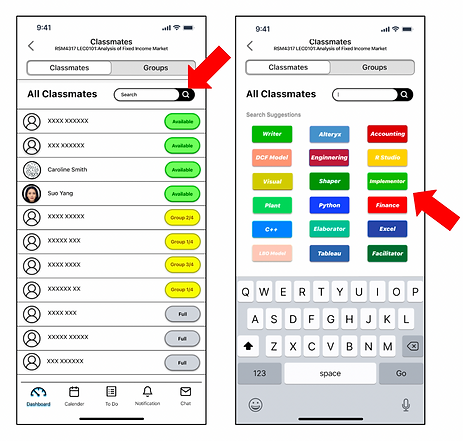
Problem 1
Some users indicated searching for classmates based on their tags was not intuitive for participants. They suggested updating it to a filter.
Furthermore, they also stated these search tags had too many colors. These colors made it hard for participants to read the text.
Potential Solution
Add a filter function, helping students better understand our tag function and still allowing students to search names through the search function.
Better categorize these labels (possibly into skill sets, working habits, and personality), change the colors to match the categories, and increase color contrast to make the text more readable.

Problem 2
Some users indicated the Progress Tracking page has a lot of functions other than tracking the project progress. It could be renamed to Project Management.
Furthermore, they also stated not all assignments can be broken down into smaller pieces and assigned to a student. Sometimes, group members need to collaborate on an assignment together.
Potential Solution
We thought more iterations are needed to better understand this problem before we make a decision on how to improve this feature.
One solution suggested by a participant is to allow a task to be assigned to multiple students.
High-fi Mockups
At last, I individually created high-fi mockups to practice my Figma skills and also hope to improve the aesthetic of the app.

Next Steps
👩💻 More user research, conduct usability testing, and iterations.
💻 Possibly contact Canvas Student to pitch our idea.
💭 Continue seeking open feedback for this product to improve the design.
My Reflection
Iteration is Essential
There's no perfect work, it is important to continue seeking feedback from others and improve the design. Especially during the low-fi and mid-fi stages. It could be costly to implement big changes once the development is done.
Teamwork Makes Everything Possible
In the UX field, collaboration and teamwork are one of the most important aspects. Working with my team was a lot of fun, everyone's contribution matters.